Business Card Solution

Business Card QR Code Generator

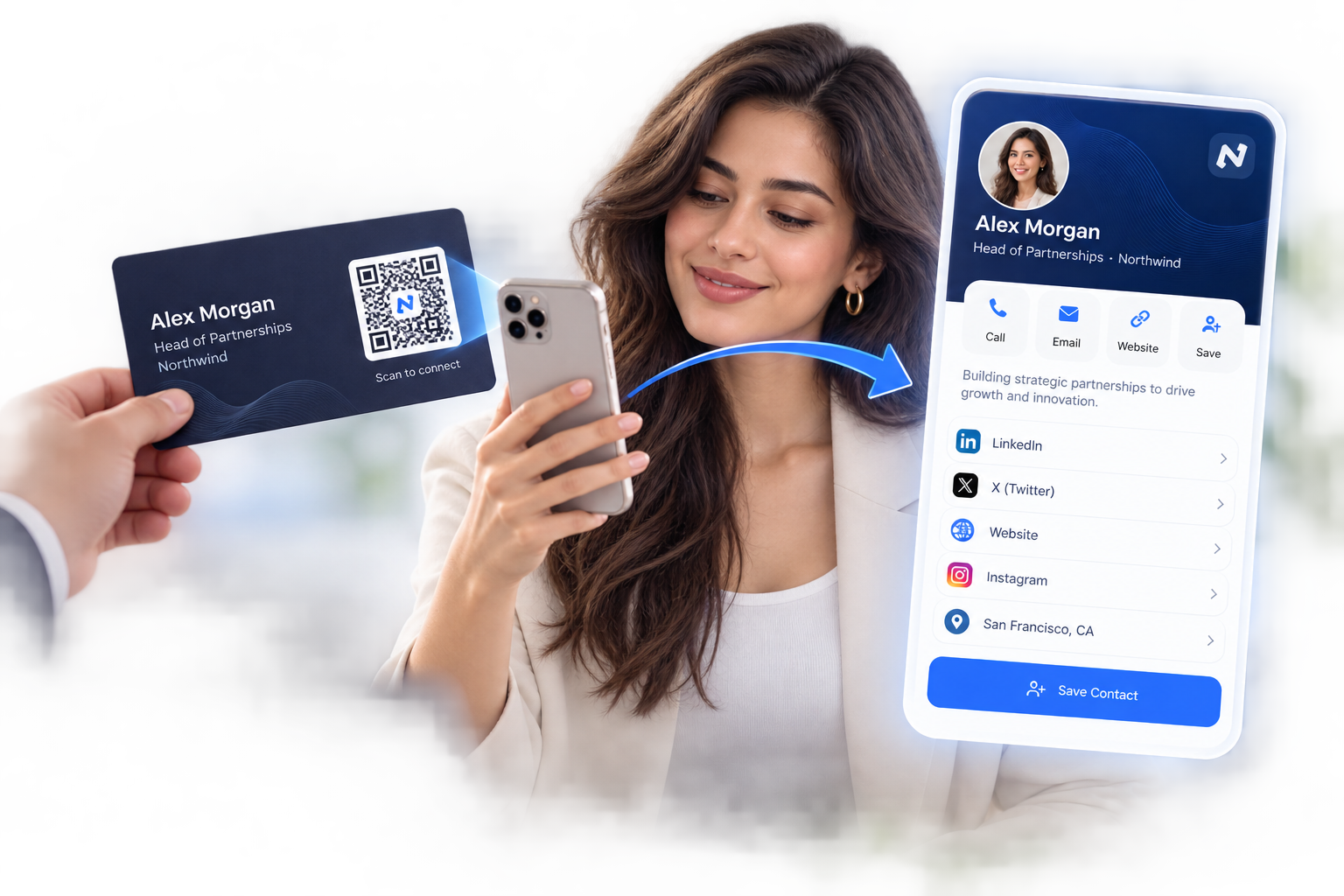
Put a QR code on your business card that opens your digital business card — contact details, links, and socials, saved to their phone in one scan. Update everything after printing, and see exactly when your card gets scanned.

Free to start — no credit cardEdit details after printingReal-time scan tracking

Business Card

Alex Morgan

Head of Partnerships · Northwind

+1 (555) 014-2287
alex@northwind.co

Save contact

Added in one tap · no typing

Saved

1 scan

To save your contact details

0 typing

No numbers keyed in by hand

Editable

New role? Update, don’t reprint

Tracked

See when your card gets scanned

Why put a QRBold QR code on your business card

Paper cards get lost. A scanned contact stays in their phone forever.

Contacts save you in one scan

A QR code on your business card opens your details — name, title, phone, email, website, socials — ready to save to the phone in a tap. No retyping from a card at the bottom of a bag, no lost leads after the event.

Update your details without reprinting

New job title? New phone number? With a QRBold dynamic code, the printed card stays the same while the details behind it change in your dashboard. One box of cards can last an entire career.

Know when your card works

See real-time scans with cities, devices, and times. After a conference, you know exactly how many of the cards you handed out turned into an actual connection — something paper alone can never tell you.

A code that matches the card

Style the QR code with your brand colors and logo so it looks designed, not stuck on. Export vector SVG or PDF that stays razor sharp at business-card print sizes.

Create a business card QR code in four steps

From contact details to a print-ready code in minutes — no designer required.

1

Add your contact details

Enter your name, title, company, phone, email, website, and social links. QRBold turns them into a scannable digital business card page.

2

Style your code

Match the QR code to your card design with brand colors, your logo in the center, and a subtle frame like “Scan to connect”.

3

Print it on your card

Download vector SVG or PDF and drop the code into your card layout — front, back, or corner. It stays sharp at any print size.

4

Update and track forever

Change roles, numbers, or links anytime — the printed code keeps working. Watch scans arrive in real time so you know your card is doing its job.

Smart business cards for every profession

Anyone who hands out a card can make it scannable — and make every handshake measurable.

Sales & business development

Every card handed across a table becomes a saved contact and a measurable touchpoint.

Conferences & networking

Win the follow-up: your details land in their phone before the conversation ends.

Agencies & consultants

One scan opens your portfolio, services, and booking link alongside your contact info.

Real estate agents

Cards that open your listings, reviews, and a tap-to-call button for hot leads.

Doctors & clinics

Let patients save the front-desk number and find booking info without typing a digit.

Lawyers & finance

A discreet, professional code that shares full credentials and office details instantly.

Freelancers & creatives

Link your card to your portfolio, showreel, or latest work — updated whenever it changes.

Teams & enterprises

Generate consistent branded codes for the whole team, managed from one account.

Saved in one tap

Your details land in their contacts before the conversation is over.

One card, forever

Change roles, numbers, and links behind the same printed code.

Networking analytics

Real-time scans with cities, devices, and times — know which events pay off.

What is a business card QR code?

A business card QR code is a scannable code printed on your card that opens your contact details on the scanner’s phone — typically as a digital business card page with your name, title, phone, email, website, and social links, plus a one-tap “save contact” button. It bridges the oldest networking tool in the world with the device everyone actually manages contacts on.

With QRBold, the code on your card points to a dynamic digital business card you control from your dashboard. That means the printed card never goes out of date: change your title, number, or links and every card you have ever handed out instantly reflects the update — while scan analytics show you when and where your card is working.

Why add a QR code to your business card?

The weakness of a paper card is what happens after the handshake: it goes into a pocket, then a drawer, and the details never make it into a phone. Retyping a card is friction, and friction kills follow-up. A QR code removes the gap — your contact scans, taps save, and you exist in their phone with every detail intact and every link one tap away.

It also future-proofs the card itself. Reprinting cards for a new title or number is a cost paper has always carried; a dynamic code makes it unnecessary. And because QRBold tracks scans in real time, your card stops being a leap of faith: you can see that Tuesday’s conference produced 40 scans while last month’s meetup produced 4, and invest your networking time accordingly.

Best practices for QR codes on business cards

Business cards are small, so a few print details make the difference between a scan and a shrug:

  • Give it space. Keep the code at least 2 x 2 cm with a clear quiet zone — don’t crowd it against text or the card edge.
  • Use vector files. Export SVG or PDF so the fine pattern stays crisp at business-card print resolution.
  • Keep contrast high. Dark pattern on a light area of the card scans fastest; avoid printing the code over photos or metallic foil.
  • Add a nudge. A tiny caption like "Scan to save my contact" tells people what they get and lifts scan rates.
  • Go dynamic. Link to an editable digital business card rather than hard-coding details — so the card survives every job change.
  • Test the print proof. Scan the actual printed proof with an iPhone and an Android before approving the full run.

How QRBold compares to basic contact QR generators

Basic tools encode your details into a static vCard code: it works on day one, but the moment your number or title changes, every printed card is wrong — and you will never know whether anyone scanned it. Dense static vCard data also makes the pattern busy and harder to scan at small sizes.

QRBold gives your card a living backend: a branded digital business card you can redesign and update anytime, a clean short-link code that scans instantly at card size, real-time analytics with location and device breakdowns, and team-wide generation for consistent company cards. Start free with a branded code, and upgrade when you want editing, tracking, or your whole team on smart cards.

Business card QR code questions, answered

Everything you need to know about putting a QR code on your business card.

Make every card you hand out count

Create your business card QR code free with QRBold. One scan saves your contact, one dashboard keeps it current forever — no reprints, no lost leads.

Start Free

No credit card required