
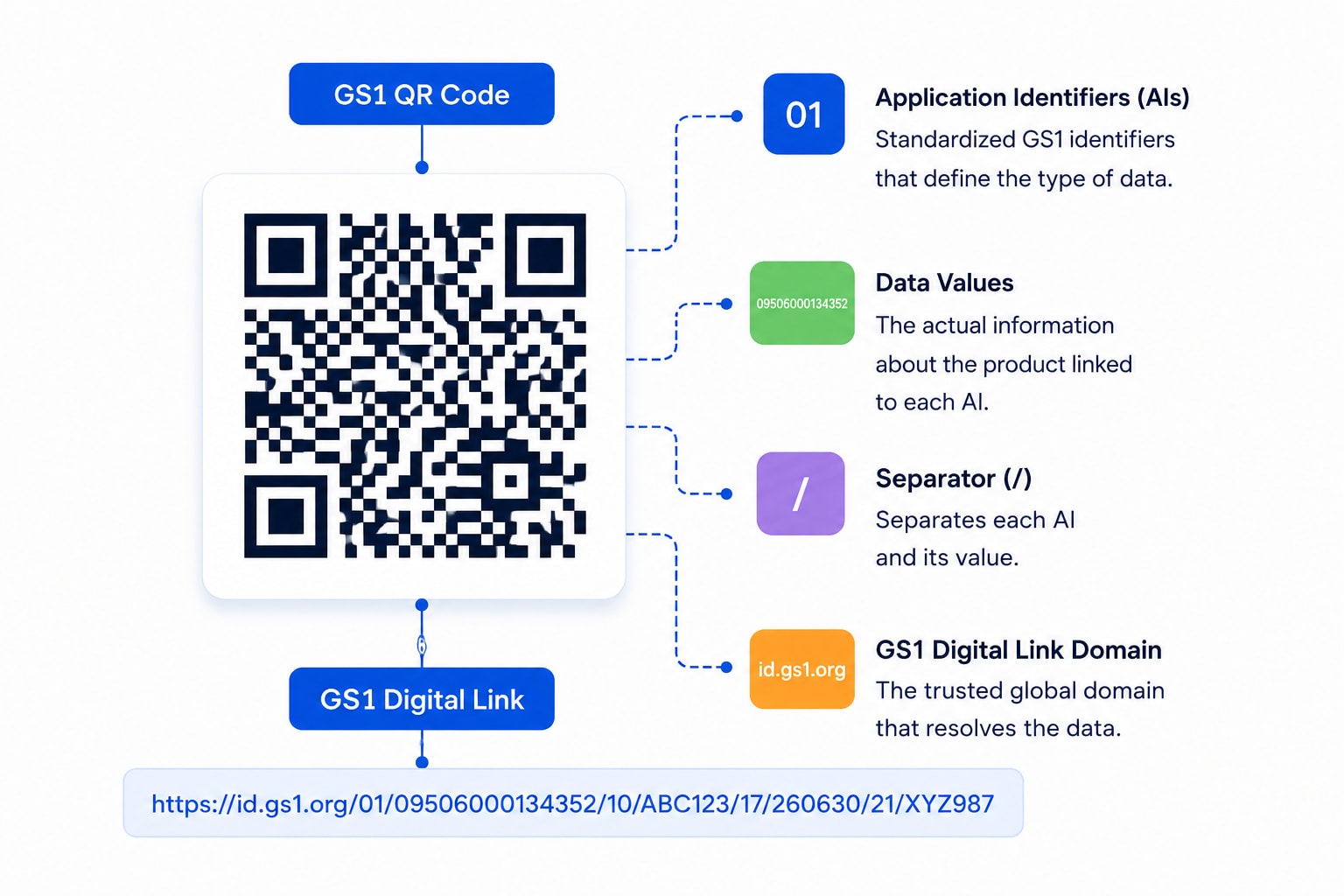
GS1 Digital Link

GS1 QR Code Generator

Encode your GTIN, batch, serial, and expiry into a single GS1 Digital Link QR code. It scans at the checkout like a barcode and opens a full product page on a shopper's phone — and you can change what it opens without reprinting a thing.

GTIN check-digit validatedSunrise 2027 readyEditable after printing
GS1 Digital Link QR code printed on product packaging

Encoded URI

id.yourbrand.com/01/09521234543213/10/A-2270?17=251231

Scan for product info
(01)GTIN09521234543213
(10)Batch / LotA-2270
(17)Expires2025-12-31

1 code

Replaces the barcode and the marketing QR

2027

Retail Sunrise deadline you can meet today

GTIN + AIs

Batch, serial and expiry in one scan

Real-time

Scans, locations & devices per SKU

Build your GS1 code

Free, no account needed. Everything is generated in your browser — your GTINs never leave this page.

Loading generator…

Every identifier your packaging needs

GS1 Application Identifiers are the standardized codes that tell a scanner what each piece of data means. Here are the ones brands encode most.

(01)

GTIN

The global trade item number that identifies the product itself. Validated against its check digit and normalized to GTIN-14 before anything is printed.

(10)

Batch / Lot

Ties every pack to a production run, so a recall can target one batch instead of an entire SKU.

(21)

Serial number

Item-level identity for warranty, authentication, and grey-market tracing — every unit becomes uniquely addressable.

(17)

Expiration date

Lets a checkout scanner block expired stock automatically, and lets a shopper see freshness at a glance.

(3103)

Net weight & measures

Variable-measure data for loose and weighed goods, decoded with the right decimal position automatically.

(00)

SSCC & logistics AIs

Pallet and shipment identifiers for supply-chain scanning, alongside GLN-based location AIs.

Why brands move to GS1 QR codes

A standardized identifier on the pack, a destination you keep control of, and analytics that follow the batch.

One code the till and the shopper both understand

A GS1 Digital Link is a real URL that carries the GTIN inside it. Point-of-sale systems read it as a product identifier and ring up the sale; a phone camera reads the same code as a link and opens your product page. You stop choosing between a barcode and a marketing QR — you print one code that does both.

Change the destination after you print

The GTIN in the URI never changes, but what it resolves to is yours to control. Update the landing experience, swap a campaign, or publish a recall notice, and every pack already on shelves serves the new content instantly. The identity stays stable; the content stays current.

Batch-level recalls without a full-SKU recall

Register a page against a specific lot or serial and it takes priority over the generic SKU page for exactly those units. One affected batch can carry a recall notice while every other pack of the same product keeps showing its normal page.

Analytics down to the batch

Every resolution is recorded: totals, unique scans, cities, devices, and times. Because the batch and serial travel inside the code, you can see engagement per production run — not just per product line.

From GTIN to print-ready in four steps

You bring the GS1 allocation. We handle the check digits, the URI structure, and the resolver.

1

Enter your GTIN

Paste the GTIN-8, 12, 13, or 14 from your GS1 allocation. We validate the check digit immediately and normalize it to the canonical 14-digit form, so a typo never reaches your artwork.

2

Add the qualifiers you need

Attach a batch/lot (10), a serial (21), a consumer variant (22), or data attributes like expiry (17) and net weight (3103). Leave them off and the code identifies the SKU generically.

3

Design the page it opens

Build the product experience with the QRBold page builder — ingredients, how-tos, provenance, reorder links — or point the code straight at a URL you already run.

4

Print the code, keep resolving forever

Export print-ready SVG or PDF and send it to your packaging supplier. The Digital Link URI on that pack keeps resolving for the life of the product, and you keep editing what it resolves to.

GS1 QR codes across the supply chain

Wherever a GTIN is already in use, a GS1 Digital Link adds a consumer-facing layer without adding a second symbol to the artwork.

Food & beverage

Freshness, allergens, and batch traceability on every pack.

Pharma & supplements

Serialized units, expiry checks, and patient leaflets.

Wine & spirits

Provenance, lot data, and age-gated brand experiences.

Cosmetics & beauty

Ingredient transparency, PAO dates, and refills.

Electronics

Serial-level warranty, manuals, and firmware links.

Grocery retail

Sunrise 2027 readiness without a second symbol on-pack.

Logistics

SSCC and location AIs for pallet and shipment scanning.

Sustainability

Digital Product Passport groundwork and recycling data.

Validated, not just encoded

Check digits, AI lengths, and date formats are verified before anything reaches your artwork.

Reads both encodings

Digital Link URIs and raw element strings with FNC1 separators are both decoded, element by element.

Ready for what comes next

The same identifier underpins Digital Product Passport and sustainability disclosure work.

What is a GS1 QR code?

A GS1 QR code is a QR code whose payload follows the GS1 General Specifications instead of being an arbitrary string. The data is organized by Application Identifiers — short numeric prefixes that declare what each field means. (01) introduces a GTIN, (10) a batch or lot number, (21) a serial number, and (17) an expiration date. Because the meaning is encoded alongside the value, any conforming scanner anywhere in the world reads the same pack identically.

There are two ways to express that data in a QR code. The traditional form is a GS1 element string: the AIs and their values packed end to end, with an invisible FNC1 separator terminating each variable-length field. The modern form is a GS1 Digital Link, where the same information becomes a web URL. QRBold reads both and generates the second.

How GS1 Digital Link works

A GS1 Digital Link turns the identifier into a path. The primary key opens the path, key qualifiers follow it in a fixed order, and data attributes go in the query string:

https://id.yourbrand.com/01/09521234543213/10/A-2270/21/SN-42?17=251231

The genius of the format is that it is simultaneously two things. To a phone camera it is an ordinary HTTPS URL, so it opens without an app. To a GS1-aware point-of-sale or warehouse scanner it is a structured identifier, so the GTIN can be extracted and used exactly as a linear barcode's would be. One printed mark, two audiences, no compromise.

The URI is also stable by design. The GTIN identifies the product permanently, but the server that resolves it decides what a scan actually shows. That separation is what lets you keep editing the experience long after the packaging has shipped.

Sunrise 2027 and the move to 2D

Sunrise 2027 is the GS1 industry initiative for retail point-of-sale systems to accept 2D barcodes — QR codes carrying GS1 data — alongside the linear barcodes they have scanned for fifty years. The driver is simple: a linear barcode holds a GTIN and nothing else, while a 2D code holds the GTIN plus batch, serial, expiry, and a link to everything else.

The practical consequence for brand owners is that packaging designed today will still be in circulation when retailers complete the transition. Adopting GS1 Digital Link now costs nothing in compatibility — the code is a working URL from day one — and means you are not redesigning artwork under deadline pressure later.

Best practices for GS1 QR codes on packaging

GS1 payloads are longer than a plain link, which makes the modules smaller at the same physical size. That raises the stakes on print quality:

  • Keep the domain short. Every character in the resolver domain competes with the identifier for space. A short subdomain such as id.yourbrand.com keeps the module count down.
  • Only encode what you need. A serial number makes every pack unique and every code denser. If you do not have a use for item-level identity, stop at the batch.
  • Export as vector. SVG or PDF keeps small modules crisp at any print size. This matters more for GS1 codes than for ordinary QR codes.
  • Respect the quiet zone. Denser codes are less forgiving of encroaching artwork. Keep clear margin on all four sides.
  • Print larger than you think. Size for the worst-case scan: a shopper in dim aisle lighting with an older phone, not your designer with a new one.
  • Test the real artwork. Scan the final proof with a phone camera and, if you can, a GS1-aware scanner. Verify the GTIN that comes out matches the one you meant to encode.

Do you need a GS1 membership?

To put a GTIN on a product sold through retail, yes — GTINs are allocated by GS1 member organizations, and QRBold does not issue them. What QRBold does is take the GTIN you already hold and turn it into a validated, resolvable, trackable GS1 Digital Link, with a product page behind it that you control.

If you are not selling through retail and do not have a GTIN, an ordinary dynamic QR code will serve you just as well. The GS1 format earns its complexity precisely when the same code has to satisfy a checkout system, a warehouse, and a shopper at once.

GS1 QR code questions, answered

Everything you need to know about GS1 Digital Link, Application Identifiers, and Sunrise 2027.

Explore more QR code solutions

One QRBold account, every type of dynamic QR code — all trackable, editable, and on-brand.

QR Code for PDF

Share menus, manuals & brochures from one scannable link.

QR Code for Google Form

Collect survey, feedback & sign-up responses fast.

QR Code for Product Packaging

Turn boxes & labels into smart, trackable packaging.

GS1 QR Code for Supply Chain

Track pallets, cartons & shipments end-to-end with SSCC & GLN.

GS1 QR Code for Asset Tracking

Serialize equipment, machinery & returnable assets.

GS1 Product Authentication

Anti-counterfeiting, serial numbers & brand verification.

GS1 Pharma Traceability

DSCSA & FMD unit-level serial & lot compliance.

GS1 Retail Sunrise 2027

Prepare POS registers & 2D barcodes for the 2027 standard.

GS1 Farm to Table Traceability

Food origin, harvest dates, organic certs & FSMA 204.

GS1 Inventory Management

SKU, batch & FEFO stock control connected to WMS/ERP.

GS1 Barcode to QR Code Migration

Step-by-step roadmap to move from 1D to 2D packaging barcodes.

GS1 Digital Product Passport

EU ESPR sustainability, recyclability & carbon footprint.

GS1 Parts & Components

Industrial serialization, GIAI, GRAI & MRO maintenance logs.

QR Code for Location

Open maps & directions to your address in one scan.

QR Code for vCard

Share contact details & save them in one scan.

QR Code for WiFi

Let guests connect to WiFi without a password.

QR Code for Menu

Open your digital menu — update it without reprinting.

QR Code for App Download

One code routes to the App Store or Google Play.

QR Code for Social Media

Link all your social profiles from one scan.

QR Code for Video

Play a video on any phone with one scan.

QR Code for Reviews

Collect Google reviews & feedback in one scan.

QR Code for WhatsApp

Start a WhatsApp chat with your business instantly.

QR Code for Events

Share details, RSVPs & tickets in one scan.

QR Code for Coupons

Deliver discounts & track redemptions in one scan.

QR Code for Website

Turn any URL into a trackable, editable QR code.

QR Code for Business Cards

One scan saves your contact — editable after printing.

QR Code for Instagram

Grow followers from packaging, signage & print.

QR Code for YouTube

Play any video or channel with one scan.

QR Code for Weddings

Guest photos, RSVPs & details in one elegant scan.

One code for the checkout and the shopper

Create your first GS1 Digital Link QR code free. Validate your GTIN, attach the batch and expiry, and keep editing the page behind it long after the packaging ships.

Start Free

No credit card required